
Detect Hidden Devices: DarkEye
One Music PlayerTools
4.7147.00 Reviews
- Version
- 2.1.0
- Installs
- 100.00K
- Age Rating
- Everyone
Screenshots
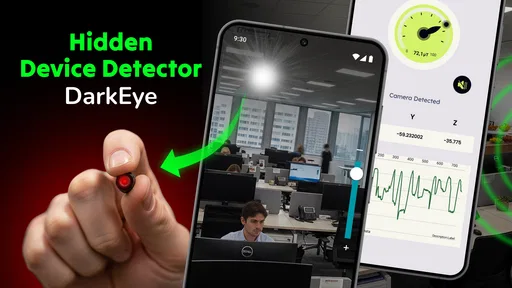
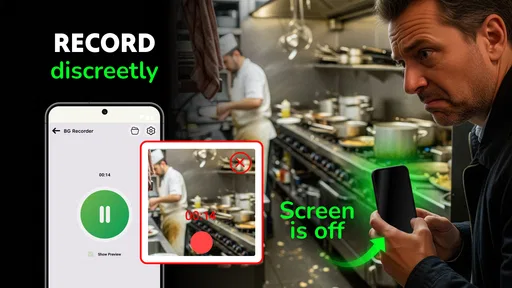
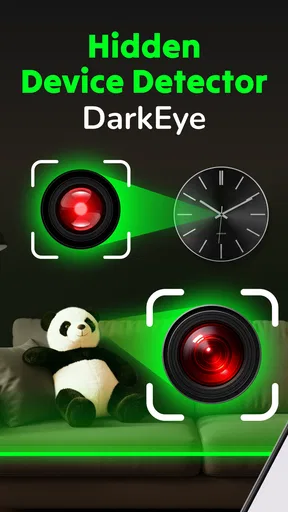
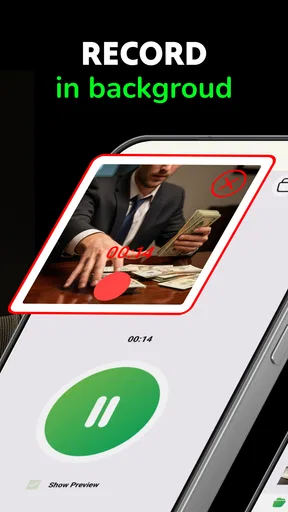
Our Review of Detect Hidden Devices: DarkEye
 Analysis by Appyee
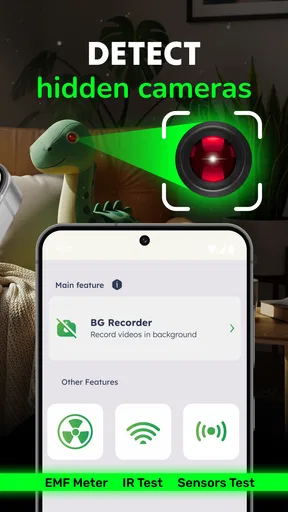
When I first opened Detect Hidden Devices: DarkEye, I approached it as a practical tool rather than a magic security scanner. Its purpose is easy to understand: help you look for suspicious cameras or microphones and record video when you need visual evidence. That makes it most interesting in situations where you are entering an unfamiliar room, checking a rental, or simply wanting a more organized way to inspect your surroundings.
My overall impression is that the app is useful as a guided first check, especially because it puts several privacy-related tasks in one place. It is not a replacement for professional inspection equipment, and I would not treat an alert as proof that a hidden device is present. Used with common sense, however, it can give you a repeatable workflow instead of relying only on a quick glance around the room.
From an unfamiliar room to a more informed decision
I find that an unfamiliar room is easier to assess when I treat the phone as a prompt to look more carefully, not as a verdict. In the next section, I focus on the small setup choices that make a check more orderly, including how to keep the inspection and any recording purposeful rather than turning a quick visit into a confusing sweep.
Starting with the right expectation
The first important step is understanding what this Android tools app can and cannot do. DarkEye is designed to assist with detecting hidden cameras and microphones, while also letting you record video. That combination sounds broad, but the quality of the outcome still depends heavily on the room, the phone, the lighting, and how carefully you investigate anything unusual.
I would use it when I want an additional layer of confidence, not when I need a certified security examination. A phone-based detector can point your attention toward something worth checking. It cannot automatically tell you whether every object in a room is harmless or whether a suspicious signal belongs to a recording device. That distinction matters because false confidence can be just as unhelpful as unnecessary alarm.
The app comes from One Music Player and is free to install. It is marked for Everyone, so its presentation is accessible even if you are not technically minded. The current version is 2.1.0, and it runs on Android 8.0 or later. Those details make it approachable for people using older compatible phones, although the actual experience can still vary depending on the handset’s sensors and camera hardware.
Preparing before scanning
My advice is to begin with the room itself, before touching the scan controls. Look at objects that have a clear view of beds, desks, changing areas, or entrances. Smoke detectors, clocks, chargers, decorative electronics, wall fittings, and unfamiliar adapters deserve a closer visual check because their position and appearance often tell you more than an isolated app warning.
This preparation is one of the less obvious strengths of using a tool like this: it gives you a reason to slow down. Rather than waving the phone randomly, I would divide the space into zones and inspect each one in turn. Start near the entrance, move around the walls, then check furniture and objects facing private areas. Keeping that order makes it easier to remember what you already examined.
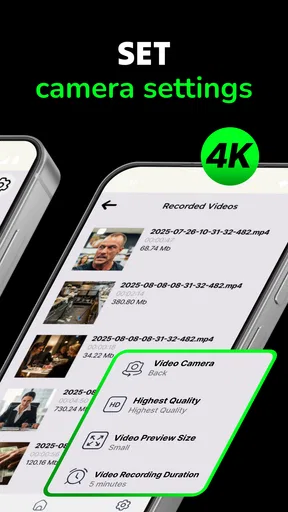
Before beginning, I would also make sure the phone has enough battery and storage for any video you may record. DarkEye includes video recording, but that feature is most useful when you already know what you want to document. Recording the entire inspection can create a large, disorganized file, while short clips of a questionable object or room layout are easier to review and share with someone you trust.
Following the inspection flow
Once I start the detection process, I treat every result as a prompt for a second look. I move slowly and keep the phone close enough to inspect likely hiding places without rushing from one object to another. If the app draws attention to an area, I compare that result with the physical scene: Is there an unfamiliar device? Does the object have a plausible purpose? Is it pointed toward a sensitive area? Is there a cable or power source that makes sense?
This is where the app’s workflow becomes more useful than a simple one-tap promise. The software can help focus your attention, but your judgment supplies the context. A result that appears in a room full of electronics deserves a different response from one that appears beside an unexplained object facing a bed. I would never remove, unplug, or dismantle anything based only on an on-screen indication.
The microphone-detection side deserves the same caution. A phone can help you investigate possible audio-related concerns, but a result should not be interpreted as a complete map of every microphone in the room. I use it as one part of a broader check: inspect visible objects, listen for unusual equipment, consider who controls the space, and document anything that genuinely looks out of place.
A practical tip is to repeat a suspicious check from a slightly different position. If the result appears only when the phone is held at one unusual angle, I would give it less weight than a consistent indication around the same physical object. Repeating the pass also helps separate a meaningful lead from a momentary reading caused by the phone’s movement or nearby electronics.
Using video as the handoff between discovery and action
The recording function is valuable because it connects the inspection stage with whatever happens next. Suppose I am staying in a short-term rental and notice an unfamiliar object aimed toward a private area. Instead of relying on memory, I can record the object in place, include the surrounding room for context, and capture the cable or mounting position without touching it.
That kind of short, steady record is more useful than an emotional description. I would begin with a wider view, then move closer while keeping the object recognizable. If the app’s detector has highlighted the area, I would record the relevant screen or result only if it can be done clearly and without losing the physical context. The goal is not to produce dramatic footage; it is to create a neutral account of what was present and where.
This is also where friction can appear. A phone is not always easy to hold steady while inspecting a ceiling fixture or a small object behind furniture. The recording feature helps, but it does not remove the need for good framing. If you are documenting a concern for a host, property manager, or authority, make sure the clip shows enough of the room to explain the location rather than presenting only an indistinct close-up.
Handing the result to another person
DarkEye does not replace the human handoff that follows an inspection. If I find something genuinely suspicious, I would preserve the original recording, note the room and object, and contact the appropriate person without confronting anyone aggressively. In a rental, that may mean the platform or property manager. In a workplace, it may mean a supervisor or security contact. The right route depends on the setting and the seriousness of the concern.
A useful workflow is to keep three things together: the video, a short written description, and the time and place of the inspection. I would avoid editing the original clip before sending it. If I need to make a shorter copy for convenience, I would keep the untouched version as well. This is a small but important trade-off: the app can help you collect material, but organization determines whether another person can understand it.
If the result is only a vague alert with no physical object to match, I would not pass it on as a confirmed discovery. I would describe it honestly as something that prompted further checking. That wording protects you from turning an uncertain technical reading into an accusation, and it gives the recipient a clearer basis for deciding what to do next.
What the outcome really tells you
The best outcome is not necessarily a dramatic detection. Sometimes the app simply helps me complete a careful inspection and feel more confident that I looked at the room systematically. That is a realistic benefit for travelers, students, people moving into a new office, or anyone who wants a repeatable privacy check before settling in.
When DarkEye points me toward an object that also looks physically unusual, the combination is more meaningful than either clue alone. I would then document it, avoid tampering, and seek confirmation through the appropriate channel. The app’s video capability supports that process by preserving visual context, while the detector gives the inspection a starting point.
Its free status makes experimenting with that workflow easy, although the app includes in-app purchases ranging from $0.99 to $99.99 per item. I would pay close attention to what any optional purchase changes before committing, especially because the core question is whether the app fits your needs as a supplementary check. A purchase cannot turn a phone into professional counter-surveillance equipment, so the value depends on how often you expect to use its particular tools.
Where the workflow breaks down
The biggest limitation is the gap between detecting something unusual and identifying what it is. A phone app may draw attention to an area, but it cannot provide the certainty of a trained technician using specialized equipment. Rooms with many electronic devices can also make interpretation more complicated, and a user who expects a simple green-or-red answer may find the process frustrating.
The microphone side is especially easy to overinterpret. Audio surveillance can be concealed in ways that are difficult for a general-purpose phone tool to establish conclusively. I would therefore treat this feature as an investigative aid, not as proof that a room is clear. If the stakes are high, professional help is the better option.
Video recording has its own practical limits. A clip can document what you saw, but it does not automatically establish ownership, intent, or whether an object is functioning. It is also possible to record sensitive people or private conversations unintentionally. I would frame only what is necessary, avoid filming bystanders where possible, and store the footage carefully.
Another point is that the app is specifically an Android tool. If your main phone is an iPhone, this particular version is not the natural fit for your everyday setup, and switching devices just for an inspection may be inconvenient. Even on a compatible Android phone, older hardware can make camera handling or general responsiveness less comfortable than on a newer model.
I would also skip DarkEye if you are looking for a fully automated guarantee. The app is better suited to someone willing to inspect, compare, repeat, and document. People who want a professional-grade sweep, a formal report, or reliable conclusions in a high-risk environment should choose a qualified security service instead of relying on a consumer app.
Who will get the most from it
For a traveler arriving at an unfamiliar accommodation, the app can provide a sensible first-pass routine: inspect the room by zones, investigate unusual objects, record relevant details, and escalate only when the physical evidence supports concern. That is a stronger use case than simply launching the app and expecting it to reveal everything hidden.
It can also help someone moving into a shared office or temporary workspace establish a baseline. Recording the room before using it may be useful when you need to remember how an object was positioned on arrival. The same approach works for checking a meeting room before discussing something private, provided you understand that the result is supportive evidence rather than a guarantee.
I would recommend it to users who value a structured process and are comfortable making cautious judgments. The rating of 4.7 from around 3.4 thousand ratings suggests that many users find the app appealing, and its reach of over 100 thousand installs shows that it has found a sizeable audience. Those figures make it worth considering, but they do not remove the need to evaluate results carefully.
My final view is that DarkEye is most useful when it changes your behavior from casual suspicion to documented inspection. It gives you a starting point for checking cameras and microphones, and its recording tool helps carry observations into the next conversation. Use it as an extra set of eyes, not as a final authority. With that expectation, it is a practical free tool for everyday privacy checks; without it, the app can easily be asked to promise more certainty than a phone-based detector can responsibly provide.
Verdict
Strengths of Detect Hidden Devices: DarkEye
- Quick scans can help identify suspicious cameras or recording devices.
- Simple interface makes the main detection tools easy to access.
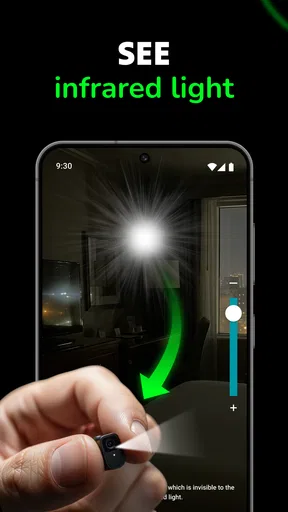
- Useful flashlight for checking dark corners, vents, and small spaces.
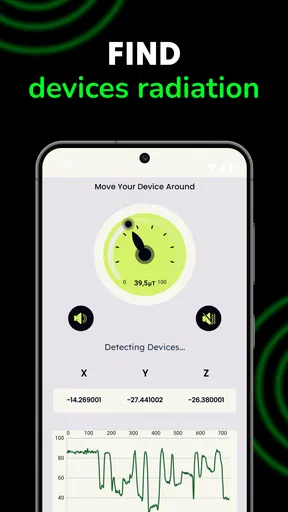
- Magnetic-field readings may reveal some nearby electronic equipment.
- Helpful for basic privacy checks in hotels, rentals, or unfamiliar rooms.
Limitations of Detect Hidden Devices: DarkEye
- Phone sensors cannot reliably detect every hidden camera or microphone.
- Results may be affected by Wi-Fi routers, speakers, and other electronics.
- Some features may require in-app purchases or display frequent advertisements.
- False alerts can occur when scanning near ordinary metal objects.
- It should supplement, not replace, a careful physical inspection of the room.
Other Releases by One Music Player
View All
Universal Tv Remote-Cast to TV
House & Home4.1

HD Camera for Android
Beauty4.5

Smart Watch - Clock Wallpaper
Personalization4.6

AirTag Scan: Bluetooth Tracker
Tools4.5
Similar Picks in This Category
View All
Google LLC4.0

Gboard - the Google Keyboard
Google LLC4.5

Google Play services
Google LLC4.3

Google Play Store
Google LLC4.9

Files by Google
Google LLC4.5

SHAREit: Transfer, Share Files
Smart Media4U Technology Pte.Ltd.4.3
Frequently Asked Questions
What is Detect Hidden Devices: DarkEye and how does it work?
Detect Hidden Devices: DarkEye is designed to help users inspect their surroundings for objects that may resemble concealed cameras or other electronic devices. It may use your phone’s camera, flashlight, magnetic sensor, and visual scanning tools, depending on the device. Results should be treated as indications rather than proof, because walls, furniture, metal objects, lighting, and phone hardware can affect accuracy.
Can DarkEye reliably find every hidden camera or listening device?
No app can guarantee the discovery of every hidden camera, microphone, tracker, or recording device. DarkEye can support a basic visual and sensor-based inspection, but it cannot replace professional counter-surveillance equipment. Some devices are powered off, shielded, connected to a separate network, or too small to detect with a smartphone. Always verify suspicious findings manually and consider professional help when privacy or safety is at risk.
What permissions does Detect Hidden Devices: DarkEye require?
The application may request access to features such as the camera, flashlight, device sensors, and possibly network-related functions used for scanning or analysis. These permissions should match the app’s stated features, but you should review them before accepting. If a permission seems unnecessary, deny it or check the developer’s privacy policy. Avoid granting access that you are not comfortable providing, especially for sensitive environments.
Is Detect Hidden Devices: DarkEye free to download and use?
Availability, pricing, advertisements, and in-app purchases can vary by platform, country, and app version. Some functions may be available without payment, while advanced tools or an ad-free experience may require a purchase or subscription. Before downloading, review the current Google Play or App Store listing carefully, including trial terms and automatic-renewal details, so you understand any potential charges.
How should I use DarkEye when I find something suspicious?
Use DarkEye as an initial checking aid rather than making immediate accusations or taking unsafe action. Inspect the object from different angles, repeat the scan in another location, and compare readings with ordinary metal or electronic items. Do not dismantle unfamiliar equipment or enter restricted areas. If you believe a device is recording you without consent, document the situation safely and contact the property owner, platform, or local authorities.
